


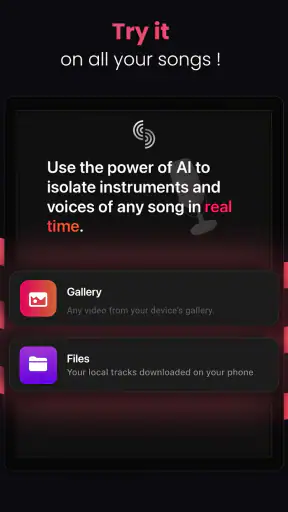
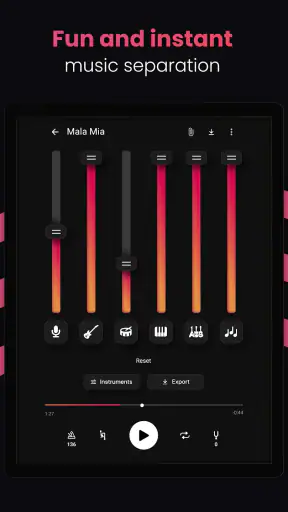
I tried Stemz: AI Tool for Musicians as a practical music utility rather than treating it like a full digital audio workstation, and that distinction matters. This is a Music & Audio app from MWM - AI Music and Creative Apps that focuses on separating vocals and instruments from a song. In everyday terms, it is designed to help you pull a track apart so you can work with its musical pieces instead of only listening to the finished mix.
That makes it immediately interesting for singers, beat makers, musicians learning songs, DJs, remix hobbyists, and anyone who wants to study how a recording is assembled. I also think its appeal is easy to misunderstand: it is not a replacement for a complete recording setup, and it does not magically turn every source into clean studio stems. Its value is in making certain tasks quicker and more accessible, especially when you have a finished audio file and need a useful starting point.
The app is free to install, carries an Everyone content rating, and has reached over one million installs. Its average score sits at 4.4 from roughly twelve thousand ratings, which suggests that the central idea works well for many users while still leaving room for the limitations that come with AI-based audio separation.
How Stemz feels in current use
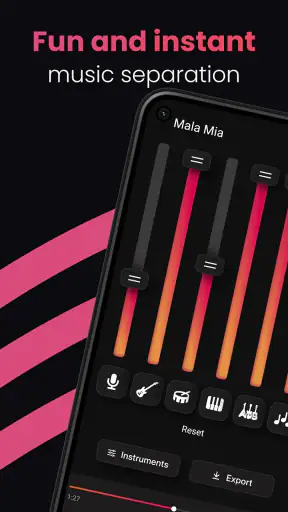
The first thing I noticed is how focused the experience is. Instead of surrounding the separation tool with a large collection of unrelated music-making features, Stemz puts the main job at the center: take a song and divide its audible parts into separate tracks. That simple purpose makes the app approachable for someone who does not already understand routing, buses, spectral editing, or multitrack production.
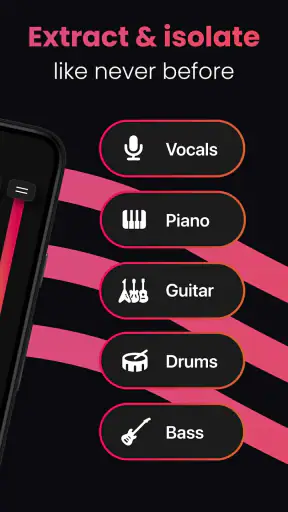
For a vocalist, the attraction is obvious. You can use an instrumental-oriented result to rehearse without the original lead vocal competing with you. For a musician, separated parts can make it easier to listen closely to a bass line, drum pattern, guitar phrase, or vocal arrangement. For a creator, the output can become a rough ingredient for a remix or a short-form video soundtrack.
I would describe the current experience as a fast preparation stage rather than a complete production environment. The separation is the important event; everything after that depends on what you want to do with the resulting material. If your goal is simply to hear one element more clearly, the app can be very convenient. If you want detailed editing, precise timing correction, mastering, or a polished release, you will probably need another audio application afterward.
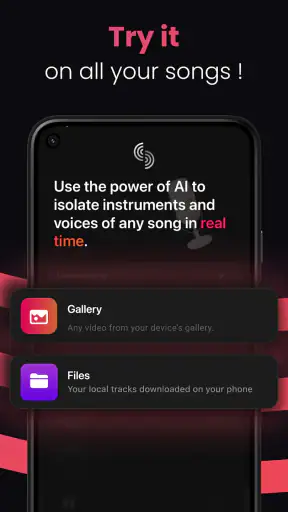
That is not necessarily a weakness. In fact, keeping the main task understandable is one of Stemz’s strengths. Many music tools become intimidating because they expose every technical control at once. Here, the concept is much easier to grasp: select or provide a song, let the processing work, then listen to the separated results and decide what to do next.
A useful workflow for singers and learners
My favorite practical use is rehearsal. Imagine that you are learning a song for a small performance and the original recording has a vocal line that makes it difficult to judge your own pitch. Instead of searching for an official backing track, you can try separating the vocal from the accompaniment and use the resulting instrumental version as a practice base.
The important word is “try.” Separation quality depends on the recording itself. A clean, familiar arrangement with distinct instruments may produce a more useful result than a dense mix containing effects, layered harmonies, distorted guitars, or heavy reverberation. I would listen through the result before building a whole rehearsal session around it. If the lead vocal leaves behind obvious echoes or the instruments become watery, the file may still be useful for casual practice, but not for demanding performance preparation.
There is another smart learning workflow here. Rather than isolating a part only to copy it, I would compare the original with the separated version repeatedly. Lowering the distraction from other elements can help you notice how a bass line supports the kick, where a guitar enters, or how a backing vocal answers the lead. That makes the app useful as a listening aid, not just a source of karaoke-style instrumentals.
For beginners, this can be more approachable than opening a workstation and trying to recreate a song from scratch. You are studying an existing arrangement in a way that encourages active listening. The trade-off is that the separation is an interpretation of the mix, not the original multitrack session. It should guide your ear, not be mistaken for untouched studio material.
Where creators and DJs can save time
Stemz also makes sense in early-stage creative work. A producer might want to test whether a vocal phrase fits a new rhythm before spending time building a full arrangement. A DJ or remix hobbyist might want to experiment with transitions using a vocal-focused or instrumental-focused version. A content creator could use a separated section to plan a short edit, provided the intended use respects the rights attached to the music.
The useful insight is to treat the output as a sketching tool. I would not begin by expecting a release-ready acapella. I would begin by asking a smaller question: does this phrase work over that beat, does this chorus need space, or does this drum pattern suggest a different tempo? If the answer is yes, the app has already saved time even if the final audio later needs replacement or cleanup.
One practical tip is to process a short, representative section before committing to a longer project. A chorus with stacked vocals and strong effects will reveal more about the separation quality than a quiet verse. This lets you judge whether the result is suitable for your purpose before arranging an entire song around it.
Another is to keep the original file untouched and compare outputs at a comfortable volume. Artifacts can become more noticeable when you turn the speakers up, but loud listening can also make a rough result seem more dramatic than it is. I prefer checking the isolated parts at moderate volume, then returning to the full mix to confirm that the musical relationship still makes sense.
What the AI separation can and cannot do
AI separation is impressive because it works from a completed mix rather than requiring access to the original recording session. At the same time, it is solving a difficult problem: several sounds may occupy the same frequencies, share the same room ambience, or overlap during the same moment. When the app divides them, some of that shared information has to be estimated.
In practice, that can lead to familiar trade-offs. A vocal may retain a faint trace of the backing track. Cymbals can become soft or smeared when drums are isolated. Reverb may remain attached to a voice, while a guitar can lose some body if it overlaps heavily with other instruments. These are not reasons to dismiss the tool; they are reasons to choose the right job for it.
Stemz is strongest when speed and access matter more than perfect studio isolation. That makes it particularly useful for exploration, rehearsal, education, and rough remix planning. It is less convincing as the only step in a professional release workflow where every artifact, transient, and background tail needs close inspection.
I would also avoid judging the app from a single difficult song. Different arrangements place very different demands on separation. A simple track may produce a clean and useful result, while a crowded production can expose more bleeding between parts. The fairest evaluation is to test the kind of music you actually plan to use, not an unrelated example chosen because it happens to separate well.
Changes, compatibility, and the experience for returning users
The current version is 1.20.00, and the app was released on February 17, 2023. Those details place it in a more mature phase than a brand-new experiment, but I would still judge each update by what it changes in daily work rather than assuming that a higher version number guarantees a major transformation.
For someone returning after earlier use, the most meaningful question is whether processing feels dependable and whether the results fit the same workflows. A separation app lives or dies by consistency: importing a song, waiting for analysis, finding the resulting parts, and using them without confusion. Small improvements in stability or handling can matter as much as a headline feature because they reduce the friction between an idea and a listenable test.
I would keep expectations measured when interpreting product evolution. The confirmed version and release history show that Stemz is an established app with ongoing presence, but they do not by themselves prove that every difficult separation problem has been solved. AI audio tools can improve through processing changes, yet the source recording remains a major part of the outcome.
Existing users should therefore compare the app against their own earlier projects. If a familiar type of song now gives you cleaner vocal or instrumental results, that is a meaningful personal improvement. If your main frustration was missing editing depth, a version change may not alter the basic fact that Stemz is centered on separation rather than acting as a complete workstation.
Device compatibility is reasonably broad for Android users because the minimum operating system is Android 6.0. That helps older phones remain eligible, but eligibility is not the same as an identical experience. Audio analysis can be demanding, and the practical wait time, storage pressure, and responsiveness may vary with the device and the size of the source file. I would leave room for processing and avoid starting an important session when I need an instant result.
Costs and the point where free stops being enough
Stemz is free to install, which makes it easy to test before deciding whether it belongs in your regular toolkit. The app also offers in-app purchases ranging from $4.99 to $89.99 per item. That wide range means I would pay close attention to the exact purchase screen and the way access is presented before confirming anything.
For casual users, the free starting point may be enough to discover whether separation quality suits their music. A singer preparing occasionally or a student analyzing a few arrangements may not need a costly ongoing commitment. For someone processing songs every week, the value depends on how much time the app saves compared with manual work or other tools already available.
I would not pay simply because the idea sounds advanced. First, I would test representative songs, listen for leakage, and decide whether the resulting parts are useful in my actual workflow. If I only need a clean backing track occasionally, another source may be more practical. If I frequently need quick experiments and the output is consistently helpful, the purchase can make more sense.
This is also where Stemz differs from conventional alternatives. A standard audio editor gives you detailed control over cutting, fading, equalization, timing, and effects, but it generally does not recreate missing instrument tracks from a finished stereo mix by itself. A full digital audio workstation offers far more arrangement power, yet it can require more setup and technical knowledge. Traditional karaoke or backing-track services may provide cleaner purpose-made accompaniments, but they are less useful when you want to examine a specific recording or isolate a particular musical role.
Stemz sits between those options. It is more specialized than an ordinary player, less comprehensive than a workstation, and more exploratory than a catalog of finished backing tracks. That middle position is its reason to exist, but it also explains why it will not replace every alternative.
Remaining gaps I would consider before relying on it
The largest gap is the difference between separated audio and original stems. If you are expecting the exact vocal, drums, bass, and instruments from a studio session, this app cannot promise that kind of source access merely by analyzing a mixed recording. The output can be valuable while still containing artifacts, and professional users should plan a quality check before using it in anything public.
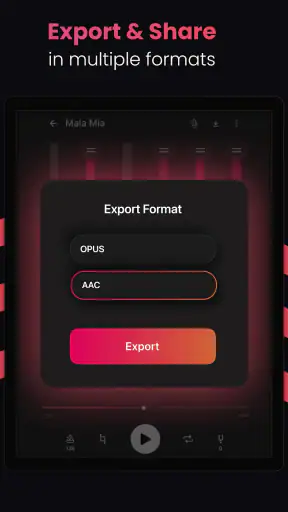
A second gap is the likely need for a second tool once separation is complete. If you want to tune a vocal, quantize drums, automate effects, build a full arrangement, or export a carefully mastered track, you will need a more capable editor or workstation. Stemz can get you to the starting line faster, but it is not the whole race.
A third consideration is source selection. A low-quality, compressed, live, or heavily reverberated recording gives the AI less clean information to work with. I would choose the best legitimate source available, avoid repeatedly converting the file before processing, and keep expectations realistic when the mix is already damaged. Better input does not guarantee perfection, but poor input can make the separation problem much harder.
There is also a creative limitation: isolated parts can tempt you to use music without thinking about permission. The app helps manipulate audio; it does not automatically grant rights to publish, distribute, or monetize the result. For private practice and study, the workflow is straightforward. For public uploads, remixes, or commercial work, I would treat licensing as a separate responsibility.
Who should use it, and who should choose something else
I would recommend Stemz to a vocalist who needs rehearsal material, a musician who learns by listening to individual parts, or a producer who wants to test ideas quickly. It is also a good fit for curious listeners who want to understand arrangements by reducing the clutter of a full mix. The app is especially appealing if you do not already own a large production setup and want a simple way to begin experimenting with stems.
I would be more cautious recommending it as the main tool for a professional engineer, a mastering specialist, or anyone who needs guaranteed clean multitracks. Those users may be better served by original session files, purpose-built stem libraries, or a full workstation with detailed restoration tools. The same applies if your priority is composing from scratch rather than dissecting existing recordings.
A realistic everyday scenario shows the sweet spot. Suppose I have a guitar lesson in the evening and want to learn the rhythm part of a song during lunch. I can use Stemz to reduce the prominence of the vocal, listen for the guitar’s timing, and loop the difficult section in whatever player or editor I use next. I am not producing a final album; I am removing one barrier between the recording and the specific skill I want to practice. That is where the app feels genuinely useful.
What I would watch as the app continues
Future progress should be judged by practical control and reliability, not only by the promise of smarter AI. I would watch for improvements that make it easier to evaluate separation quality, manage the resulting parts, and move them into a broader music workflow. Clear handling of difficult mixes would matter more to me than adding unrelated creative extras.
I would also look for a better balance between accessibility and professional usefulness. Beginners benefit from a simple interface, while experienced musicians need enough control to decide whether a stem is suitable for rehearsal, sampling, arrangement, or release preparation. The strongest evolution would preserve the straightforward entry point while making the output easier to inspect and refine.
For now, my view is positive but specific. Stemz is a focused AI audio utility, not a complete studio. Its separation approach can unlock practice, study, and quick creative experiments that would otherwise take much more time. The results still depend heavily on the source mix, and serious projects may require additional editing or cleaner original material.
I would install it because the free entry makes testing straightforward, then judge it with the songs I actually care about. If the app gives me a useful vocal or instrumental perspective, it earns a place beside my normal music tools. If I need precise, release-ready stems or deep production control, I would move to a different solution rather than forcing Stemz to do a job it was not built to handle.
Overall, this is a thoughtfully targeted Music & Audio app from MWM - AI Music and Creative Apps. Its Everyone rating makes it approachable, and its current 1.20.00 release gives it a clear, established identity. I recommend it most strongly as a fast way to explore and practice with separated song parts, with the honest reminder that the best results come when you treat AI separation as a useful beginning, not a substitute for original multitracks.


